 August 31, 2026 - BY Admin
Data Storage: Safeguarding Information in the Digital Age
Data has become one of the most valuable resources for modern individuals and businesses. Photos, documents, customer records, financial information, applications, business files, and other digital assets all need to be stored securely and accessed when required. As the amount of digital information continues to grow, reliable data storage has become increasingly important.
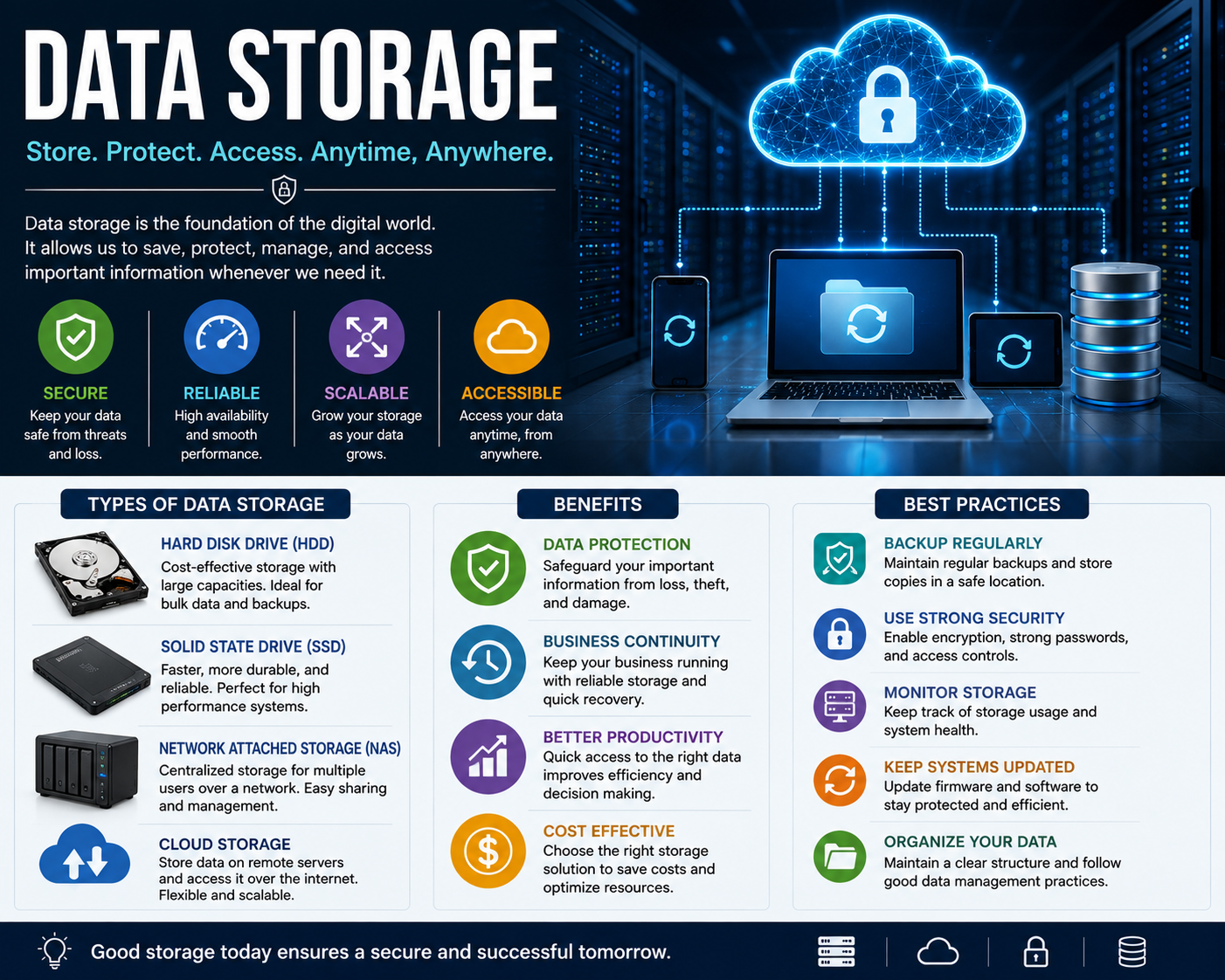
Data storage refers to the technologies and systems used to save digital information for future use. Storage can be provided through physical devices such as hard disk drives and solid-state drives, dedicated servers, network storage systems, or cloud-based platforms.
Why Data Storage Matters
Reliable storage allows users to keep important information organized and accessible. For businesses, storage is essential for maintaining operational data, customer information, applications, reports, and other critical resources.
Poor storage management can result in problems such as data loss, insufficient capacity, slow system performance, unauthorized access, or difficulty recovering information after a failure.
A well-designed storage strategy helps organizations maintain availability while protecting important information from accidental deletion, hardware failures, cyber threats, and other risks.
Types of Data Storage
There are several common types of storage solutions available today.
Hard Disk Drives
Hard disk drives (HDDs) use magnetic disks to store digital information. They have traditionally been widely used in computers, servers, and external storage devices because they can provide large storage capacities at relatively low costs.
Solid-State Drives
Solid-state drives (SSDs) use flash memory instead of moving mechanical components. They generally provide faster data access and improved responsiveness compared with traditional HDDs.
SSDs are commonly used in modern computers, servers, and other devices where performance is important.
Network Attached Storage
Network Attached Storage (NAS) provides centralized storage that can be accessed by multiple devices over a network. It can be useful for businesses and households that need shared access to files.
NAS systems can also support features such as automated backups, file synchronization, and user access controls, depending on the configuration.
Cloud Storage
Cloud storage allows data to be stored on remote infrastructure and accessed through an internet connection. It can provide flexibility and scalability without requiring organizations to maintain all storage hardware themselves.
Cloud storage is commonly used for file sharing, collaboration, backups, application data, and business information.
Local Storage vs. Cloud Storage
Local and cloud storage both have advantages.
Local storage provides direct control over physical devices and can allow fast access without relying on an internet connection. However, hardware failures, theft, physical damage, and limited capacity can create risks.
Cloud storage can provide scalability, remote accessibility, and easier collaboration. However, organizations need to consider internet availability, access controls, provider reliability, privacy, and security requirements.
Many businesses use a combination of local and cloud storage to balance performance, accessibility, cost, and resilience.
Data Security and Storage
Storing data is not enough. Organizations also need to protect it from unauthorized access and cyber threats.
Important security measures include strong authentication, access controls, encryption, secure configurations, regular software updates, and monitoring.
Access should be provided only to users who require the information for their work. Limiting unnecessary access can reduce the potential impact of compromised accounts.
The Importance of Backups
A storage system should not be considered a complete data protection strategy without backups. A hardware failure, accidental deletion, malware infection, ransomware attack, or other incident can make stored information unavailable.
Regular backups provide another copy of important data that can be restored when needed. Businesses should determine which information requires backup, how frequently backups should run, and where backup copies should be stored.
Backup recovery should also be tested periodically. A backup that cannot be successfully restored may not provide the protection an organization expects.
Managing Storage Capacity
Storage requirements continue to increase as businesses create more documents, images, videos, databases, application data, and backups.
Regularly monitoring storage capacity can help organizations identify when additional resources are required. Unused or unnecessary files can also be reviewed and removed according to appropriate retention policies.
Effective storage management can help prevent unexpected capacity issues and maintain system performance.
Storage for Businesses
Businesses often require storage systems that can support multiple users, applications, and large volumes of information. Storage solutions may need to provide high availability, scalability, security, and reliable backup capabilities.
Organizations should consider factors such as:
- Storage capacity
- Performance requirements
- Scalability
- Data security
- Backup and recovery
- Access control
- Availability
- Cost
- Compliance requirements
The right solution depends on the organization's size, workload, budget, and type of information being stored.
Future of Data Storage
The storage industry continues to evolve as data volumes increase and businesses adopt new technologies. Cloud infrastructure, high-capacity solid-state storage, distributed systems, automated storage management, and advanced data protection technologies are helping organizations manage growing amounts of information.
Artificial intelligence and automation may also improve storage monitoring by identifying unusual activity, predicting capacity requirements, and helping organizations optimize infrastructure.
Best Practices for Data Storage
Organizations and individuals can improve their storage strategy by following several practical practices:
- Use reliable storage systems: Choose storage technology that matches performance and capacity requirements.
- Maintain regular backups: Keep additional copies of important information.
- Protect stored data: Use encryption, authentication, and appropriate access controls.
- Monitor storage capacity: Track available space and plan for future growth.
- Test recovery procedures: Regularly verify that important data can be restored.
- Keep systems updated: Apply relevant firmware, operating system, and software updates.
- Organize information: Use clear file structures and appropriate data management policies.
- Plan for failures: Consider hardware failure, cyberattacks, accidental deletion, and other potential incidents.
Conclusion
Data storage is a fundamental part of the digital world. Whether information is stored on an SSD, hard drive, NAS system, server, or cloud platform, organizations need reliable methods to protect and manage their data.
A strong storage strategy combines appropriate technology with security, capacity planning, access controls, and reliable backups. By taking a proactive approach to storage management, businesses and individuals can keep important information accessible, secure, and better protected against unexpected data loss.